
In this terminal, you are located in the folder containing the file you clicked on.
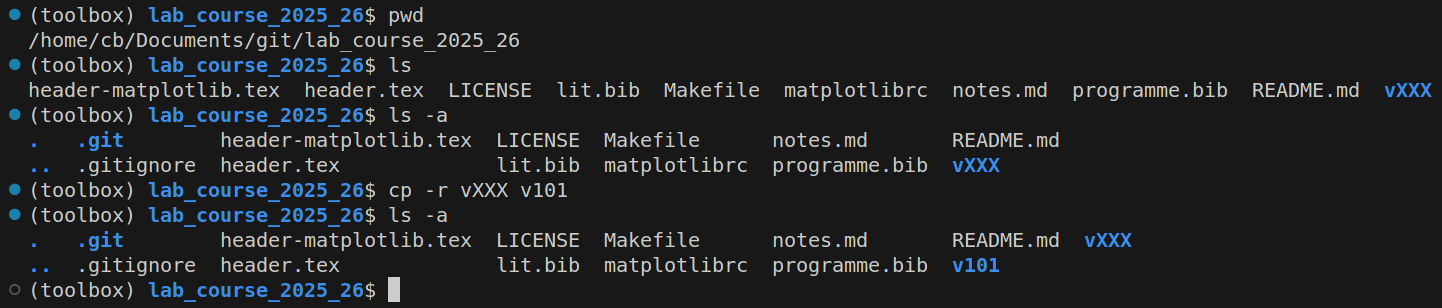
You can use the pwd terminal command to display the current path.
If the last folder in the output is the name of your repository,
then you are in the main folder.
You can use ls to list all the files and folders located in the current folder.
This should include everything shown in the left sidebar except .gitignore.
Using ls -a allows you to see .gitignore as well as the .git folder.
Files and folders with a dot at the beginning of their name
are known as hidden files and are not shown by the standard ls command.
We will now begin the data analysis and log preparation for the next experiment.
To do this, we copy the vXXX folder into a new folder using the cp command.
To keep things organized, we name the folders using the format v + experiment number.
You can also append the name of the experiment.
Here, this would be v101_Das_Traegheitsmoment.
Make sure not to use spaces or non-English accent markers in the name.
Below, we’ll show you all the commands for v101.
You can follow the same steps for any other experiment
by simply replacing 101 with the relevant experiment number.
The copying step is shown in the screenshot as the line cp -r vXXX v101.
The -r flag is important here; since we are copying a folder,
we must include it after the cp command.
Afterwards, we can see our new v101 folder in the output of the ls command.
Now, switch to the newly created folder using cd v101
(or cd followed by your folder name).
There, rename vXXX.tex to v101.tex.
cd v101
mv vXXX.tex v101.tex
Next, we change the name of the .tex file in the makefile of the newly created folder.
To do this, locate the TEXFILE variable in the first line
and replace vXXX with v101—or the name you used in the mv command.
Working on the code
Now you can work on the code. For example, you can do this by creating a folder for the recorded data and files within it for the measurement series.
mkdir data
touch data/{quader,puppe,feder}.txt
We won’t go into the details of writing the code here,
but the provided materials can be used as a reference at any time.
If you want to run the code while you are working on it,
you can bring up the terminal again using Ctrl + ` (US keyboard),
then use the up arrow key  to scroll through recent commands
and execute them by pressing Enter.
to scroll through recent commands
and execute them by pressing Enter.